


- Heim
- Produkt
- Extensions
- Analytics Lite
Support & Customization
For further changes or customization, please contact us at info@aashro.com.
Analytics Lite
 [AASHRO] ANALYTICS LITE
Privacy-Friendly Traffic Overview for TYPO3
Overview
The Analytics Lite extension is a lightweight, editor-friendly TYPO3 analytics solution that provides a live traffic overview directly in the TYPO3 backend. It is designed for teams that need essential website analytics without moving everyday reporting into a separate analytics platform.
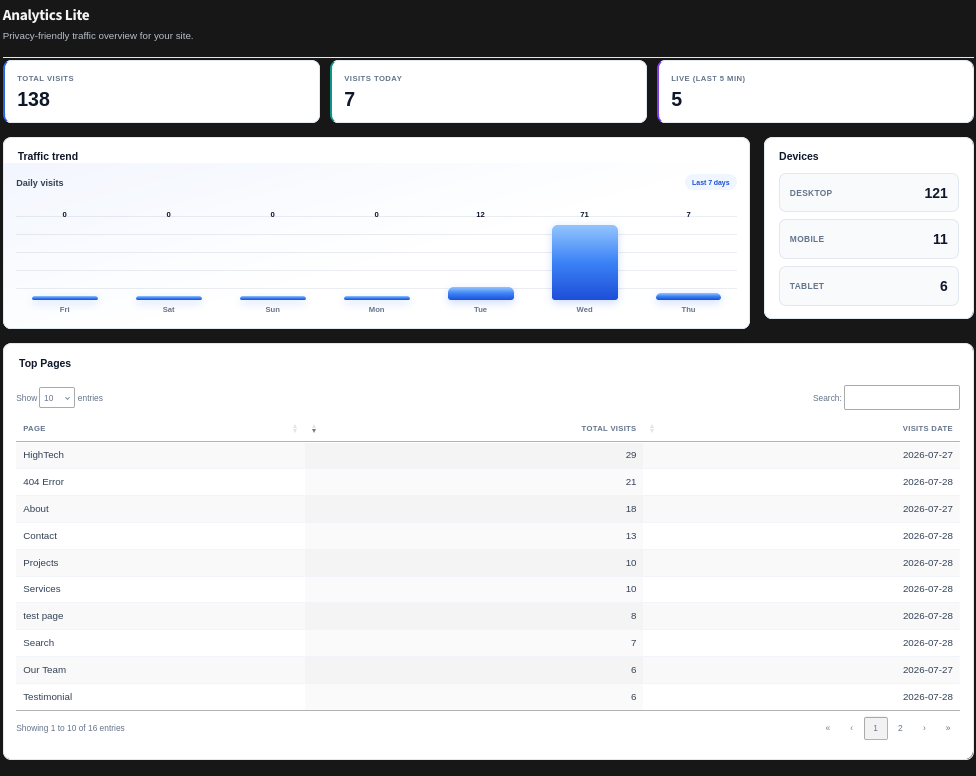
The Lite edition focuses on high-value metrics: total visits, visits today, live activity, traffic trends, device categories and top pages. The Pro edition extends this foundation with history, filtering, CSV export, event tracking and additional reporting data.
Analytics Lite is compatible with TYPO3 v12 LTS and TYPO3 v13 LTS.
Compatibility
- TYPO3 v12 LTS
- TYPO3 v13 LTS
- PHP version compatible with the selected TYPO3 release
- Database platform supported by the TYPO3 installation
Key Points
- Live TYPO3 backend dashboard - traffic information is available directly inside TYPO3.
- Privacy-focused analytics - designed around data minimization and practical traffic reporting.
- No external dashboard required - administrators can review core metrics without leaving TYPO3.
- Responsive analytics UI - dashboard cards, charts, device summaries and tables are easy to scan.
- Editor-friendly presentation - non-technical users can understand the main traffic indicators.
- Pro-ready foundation - the same analytics concept can be extended with history, exports and events.
Features
- Display total visits and daily visits.
- Show live activity from the latest five-minute window.
- Visualize recent daily traffic in a trend graph.
- Group traffic by Desktop, Mobile and Tablet.
- List top pages with visit totals and visit dates.
- Search and paginate top-page results where supported by the backend table.
- Integrate with TYPO3 backend permissions and caching.
- Provide an extensible foundation for advanced Pro analytics.
How to Install Analytics Lite
Installation via Composer
In a Composer-based TYPO3 project, add the official Analytics Lite package for your distribution/release.
composer require aashro/at-analytics-lite
Installation via Non-Composer
- Log in to the TYPO3 Backend.
- Go to the Extension Manager.
- Use the extension search or upload workflow available for your TYPO3 version.
- Install or upload at_analytics_lite.
- Activate the extension.
- Flush TYPO3 caches.
The exact TER/package identifier should match the release you distribute; use the official package name from your release documentation.
Analyze Database & Flush Caches
- Open Admin Tools -> Maintenance.
- Run the database analysis/schema comparison.
- Apply required database updates for at_analytics_lite.
- Flush TYPO3 and PHP caches.
- Open the Analytics Lite backend module and verify the dashboard.
Activate and Verify the Extension
- Log in to the TYPO3 Backend.
- Open Admin Tools -> Extensions.
- Confirm that at_analytics_lite is active.
- Review backend user permissions for the analytics module.
- Visit the frontend website to create test traffic.
- Return to the Analytics Lite dashboard and verify that counters update.
How to Use Analytics Lite
- Log in to the TYPO3 backend.
- Open the Analytics Lite module.
- Review Total Visits and Visits Today.
- Check Live (Last 5 Min) for recent activity.
- Use Traffic Trend to review recent day-by-day traffic.
- Review Devices for Desktop, Mobile and Tablet distribution.
- Use Top Pages to identify frequently visited pages.
No technical analytics platform knowledge is required for normal dashboard usage.
Use Cases
- Daily website monitoring for company websites.
- Quick traffic checks after publishing new content.
- Checking whether campaigns or promotions increase traffic.
- Understanding which pages receive the most attention.
- Monitoring device mix for responsive design decisions.
- Providing a simple analytics view to editors without exposing an external analytics platform.
Backend Configuration
Once the extension is installed and activated, administrators can open the Analytics Lite module from the TYPO3 backend. The main dashboard is intended to work as a quick overview rather than a complex configuration screen.
Available Dashboard Areas
- Summary Cards
- Traffic Trend
- Devices
- Top Pages
Summary Cards
| Card | Description |
| Total Visits | Overall visits recorded by the extension. |
| Visits Today | Visits recorded for the current date. |
| Live (Last 5 Min) | Recent visits within the latest five-minute window. |
Traffic Trend
Traffic Trend provides a visual comparison of daily visits. It is useful for spotting spikes, low-traffic days and short-term changes after publishing content or campaigns.
- Daily visit values are shown across the selected recent period.
- The chart complements the numeric Total Visits and Visits Today cards.
- Trend values are intended as a quick operational view, not a replacement for long-term reporting.
Devices
The Devices panel provides a simple breakdown of visitor device categories. The standard dashboard labels are Desktop, Mobile and Tablet.
| Device | Purpose |
| Desktop | Shows visits classified as desktop traffic. |
| Mobile | Shows visits classified as mobile traffic. |
| Tablet | Shows visits classified as tablet traffic. |
Top Pages
Top Pages identifies the content receiving the highest number of recorded visits. This is especially useful for editors and site owners who want to see which pages are attracting attention.
- Page title / page name
- Total visits
- Visits date
- Pagination for larger result sets
- Search within the table where supported
Tracking and Data Flow
Analytics Lite can be understood as a simple four-stage flow: a site visit reaches the tracking layer, relevant analytics data is persisted, aggregate values are calculated, and the backend dashboard renders the results.
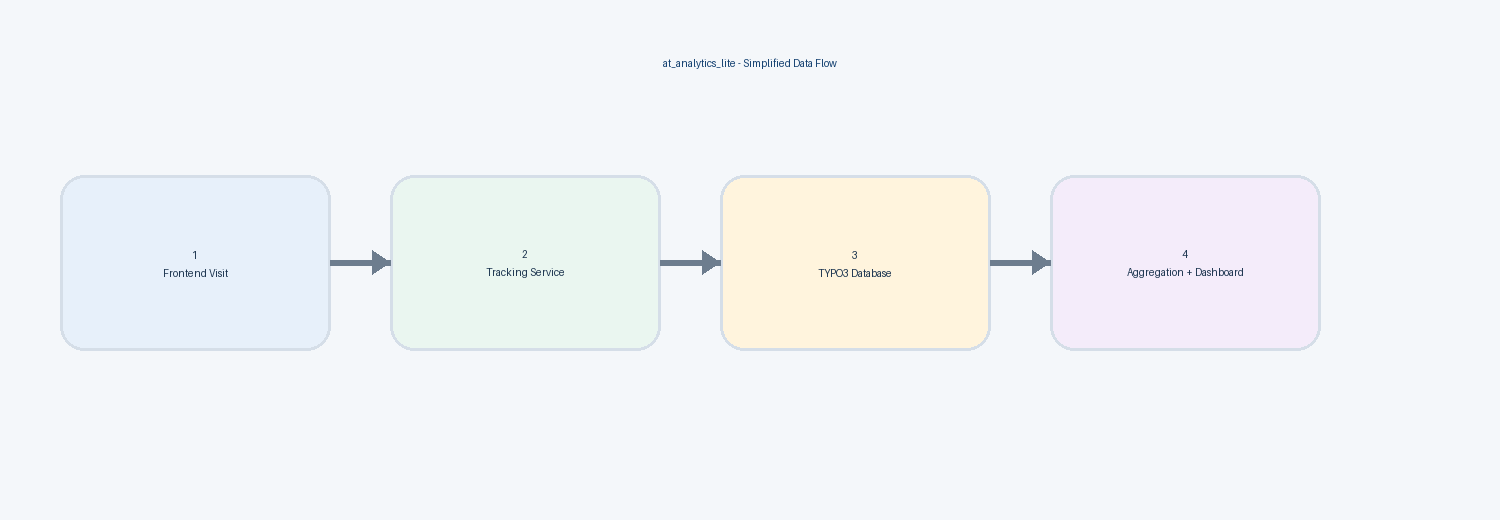
Figure 1: Simplified Analytics Lite data flow
Privacy-Friendly Tracking
The extension is intended to support privacy-conscious analytics through data minimization. A production implementation should only retain the information necessary for the enabled analytics features and should apply appropriate retention, access control and privacy policies.
- Avoid unnecessary personally identifying data.
- Use pseudonymized or hashed values where the implementation requires a stable identifier.
- Restrict backend access to authorized TYPO3 users.
- Review retention periods and clean up old analytics records where appropriate.
- Document the enabled analytics fields in the project's privacy documentation.
Typical Analytics Data
| Data Area | Example Purpose |
| Page reference | Connect a visit with the viewed TYPO3 page. |
| Language | Group traffic by language where multilingual sites require it. |
| Visit date / timestamp | Support daily and live activity calculations. |
| Referrer information | Understand where traffic originated, when enabled. |
| Device type | Group visits into Desktop, Mobile and Tablet. |
| Privacy-oriented identifier | Support analytics without exposing raw personal values in reports, where implemented. |
Analytics Pro - Advanced Features
The Pro edition is intended for projects that need deeper analysis and reporting. It extends the Lite dashboard with additional workflows rather than replacing the core traffic overview.
Analytics Lite vs Analytics Pro
| Analytics Lite (Free Version) | Analytics Pro Version |
| Shows essential live traffic metrics. | Adds historical and advanced reporting. |
| Total visits, visits today and live activity. | Adds history and date/filter workflows. |
| Traffic trend graph for recent activity. | Adds deeper filtering and analysis. |
| Device overview: Desktop, Mobile, Tablet. | Adds additional analytics data. |
| Top Pages overview. | Adds CSV export and advanced tables. |
| Best for simple day-to-day monitoring. | Ideal for reporting, investigations and deeper analytics. |
| Privacy-oriented core tracking. | Extends the same tracking model with event-level analytics. |
History
Provides access to older analytics records so administrators can review traffic over longer periods.
Filter Options
Allows administrators to narrow analytics data by supported criteria such as a From/To date range.
Download CSV
Provides CSV exports for supported tables, allowing data to be opened in spreadsheet tools and used for reports.
Events Tracking
Extends page-view analytics to meaningful interactions such as configured button clicks. Depending on the implementation, event data may include event type, event name, element identifier, element text and URL.
Additional Analytics Data
The Pro edition can expose additional analytics fields and reports. The exact field set may evolve by release, so this documentation describes the capability level.
Glossary
| Term | Meaning |
| Visit | A tracked page request counted by the analytics system. |
| Live | Recent activity calculated from a short time window, currently presented as the last five minutes. |
| Top Page | A page ranked by recorded visit activity. |
| Event | A tracked user interaction such as a configured button click. |
| Aggregation | A calculation that groups raw analytics records into totals or trends. |
A calculation that groups raw analytics records into totals or trends.
