


- Home
- Medic Care
Support & Customization
For further changes or customization, please contact us at info@aashro.com.
Medic Care
Medic Care
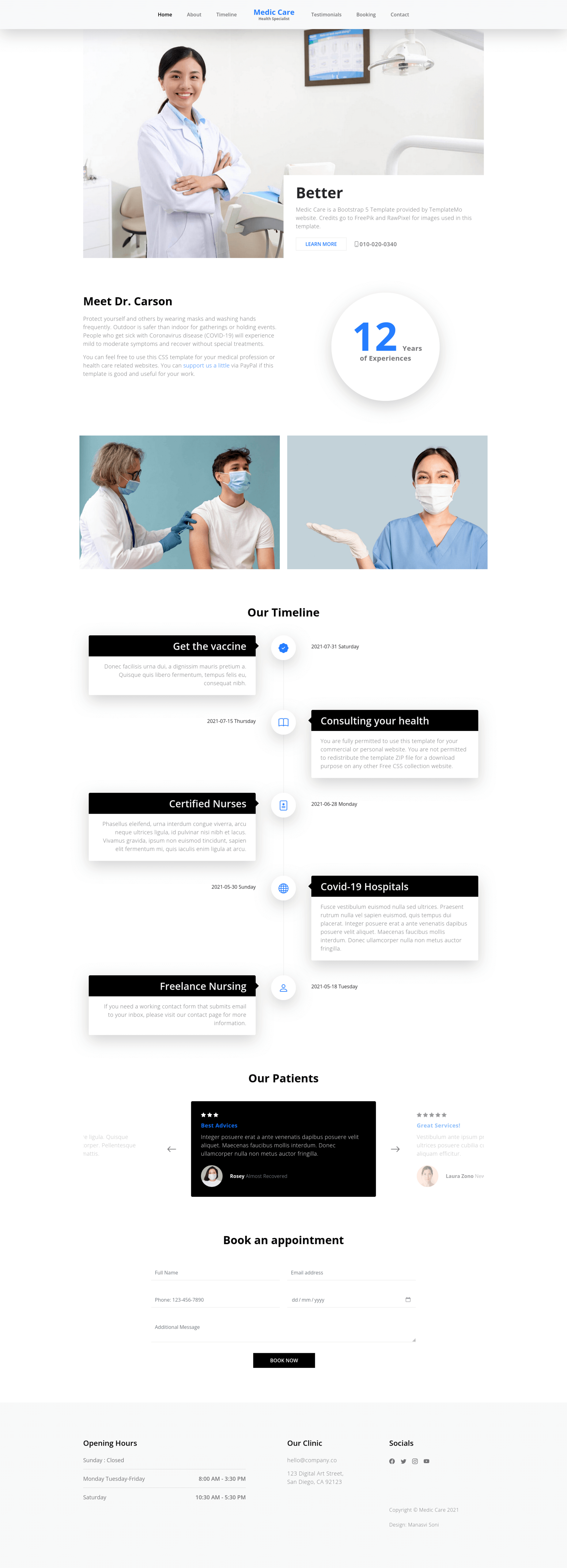
Medic Care:
 TER: https://extensions.typo3.org/extension/at_medicare
Installation
1. Composer-Based Installation
Note: If you are working in a local environment using DDEV, make sure to add ddev before each command.
- Install the Extension via Composer
Navigate to your TYPO3 project root and run the following command:
composer require aashro/at-medicare
- Run Extension Setup
After installing the extension, execute the TYPO3 extension setup command:
composer exec typo3 extension:setup
- Clear TYPO3 Caches
To ensure all configuration and generated files are correctly loaded, clear the TYPO3 cache:
composer exec typo3 cache:flush
Alternatively, you can clear the cache from the TYPO3 backend:
- Go to Admin Tools → Maintenance
- Click Flush TYPO3 and PHP Cache
2. Non-Composer Installation
This extension can also be installed in non-composer (classic) TYPO3 installations using the Extension Manager.
Installation Options
You can install the extension in one of the following ways:
- Download the extension ZIP file from TER and upload it manually
- Install it directly from the TYPO3 backend using the Extension Manager
Step-by-Step Installation via Extension Manager
- Log in to your TYPO3 backend
- Navigate to Admin Tools → Settings → Extension configuration → extensionmanager
- Uncheck “Enable automatic installation of dependencies” (automaticInstallation).
That skips the broken checkDependencies code path. The extension can still be downloaded; dependencies may need to be installed manually afterward. - Navigate to Admin Tools → Extensions
- In the top Document Header, select Get Extensions
- Click Update now to refresh the extension list
- Search for the extension key at_medicare
- Click Install
- After Installation Activate the extension
TYPO3 will setup the Theme and extension automatically.
Important Note
⚠️ Clear Cache After Installation
Please clear your website cache after installation and setup. If the cache is not cleared, the extension may not function correctly.
⚠️ Works Only on Fresh Setup
This extension is designed to work only on a new or fresh installation. If an existing theme or previous setup is already present, the extension may not work as expected.
⚠️ Disable automatic dependency installation (quickest) In the backend:
Before Installation of at_medicare
Admin Tools → Settings → Extension configuration → extensionmanager
Uncheck “Enable automatic installation of dependencies” (automaticInstallation).
That skips the broken checkDependencies code path. The extension can still be downloaded; dependencies may need to be installed manually afterward.
Core Highlights of Free TYPO3 Template:
Compatible with TYPO3 v13.4 and TYPO3 v14.3.
Built using TYPO3 Content Blocks and Aashro Tech custom extensions for flexible dynamic content management.
A "Medicare theme template" is a pre-designed framework specifically tailored for individuals, organizations, or businesses involved in the healthcare industry, particularly those focused on Medicare-related services.Users can customize to fit their specific needs in the real of Medicare services.
These templates are likely designed to incorporate elements that are relevant to healthcare, Medicare information, and related services. Placeholder sections may include spaces for healthcare imagery, icons, information about Medicare plans, and details about medical services covered under Medicare. The color scheme and overall design aim to convey a professional and trustworthy appearance, aligning with the seriousness and importance of healthcare-related content.
A Medicare theme template can be beneficial for creating a consistent and visually appealing presence across various materials, such as brochures, websites, presentations, or promotional materials. It can help healthcare professionals or organizations save time and maintain a cohesive visual identity while focusing on the crucial task of communicating essential information about Medicare services.
